Showing posts with label video tutorial. Show all posts

Tuesday, September 10, 2013

new Mask feature tutorial for Rhonna Designs App

Ok, so have you checked out the free video tutorials on Rhonna Designs? I keep adding more as I get them finished, but here's my latest: the Mask feature!  Like i've said before, Devin, our developer ROCKS!!!!! Look at how cool these features are....
For my 100 Creativity Exercises today, I pulled out #40: Creative Yoga: take 5 min. to focus on ONE creative idea. Aaaand....my creative idea was MASKING! 
so....watch, create & have fun w/ creative play today...can't wait to see your masked creations on Instagram.!

Saturday, August 10, 2013

New Insta Fonts and update v.1.2 for Rhonna Designs App

WE are sooo excited to announce the v.1.2 update in the Rhonna Designs App!

  • With 4 NEW Design packs as an 'Extras Pack 1' bundle, you get 104 new designs for .99! That's less than a penny per design...crazy cool! 
  • The NEW starter screen in the Rhonna Designs App is interactive! It's so fun! I will be featuring my favorite Instagrams from our RD fans! Just make sure you tag your photos w/ #rhonnadesigns so I can see them! 
  • Now the Photo Chooser view is up on top so you don't have to scroll down through your albums &
  • minor bug fixes.  
8.13 Update v1.2 Rhonna Designs App from Rhonna Designs on Vimeo.

As always, the original Rhonna Designs App is so chock full of goodness that you'd never ever have to purchase another design! *wink* We've gotchya covered!
But....for those of you that DO want new designs...we will be offering 4 new Design Packs each month. (We'd love to hear your requests for future designs- send us a request via the app in the 'heart')

Since this is an app that was designed to give you creativity on-the-go & glam up your iPhoneography, we wanted to share some printing options with you! 

1. Our favorite online printers, Persnickety Prints, print off your RD app photos in various sizes: 2x2, 3x3, 4x4! On amazingly gorgeous papers! AND, for you Project Lifers, you can also go into your crop tool, pinch your photo so it has the white on the edges & when you send them to Persnickety to print, choose Crop Option #1 when you are on their site and let THEM do it for you! They will cut them to 3x4- perfect to slip in your PJ covers!  And...the metallic, pearl, linen papers are seriously amazing!

2. You can also use your ZINK hAppy printers to print off 2x2, or cute little photos like I've got shown here.  I LOVE the 'zero ink'- adhesive-photos that can be printed anytime anywhere!

3. If you are still looking for higher resolution options for your photos and designs, we will always be offering the high resolution design kits ON the Rhonna Designs site.  We have the NEW design pack offered in single Insta Fonts for $10 or bundled as No. 5 Insta Lovin' bundle for only $30! 
Remember, these include the hi rez .ABR digital brush/stamp files, the .TTF font files that can be used in any program AND as cutting files for your cutting machines like the Silhouette Cameo AND the black .PNG files that can be used as clip art in any program!  Also, when you need Rhonna Designs for anything to promote a company/biz for profit, we offer Limited Commercial Licenses, too!


And, Android users'  FAQ:
We are still hoping to be able to offer it in a droid version, but...the learning continues. There are some BIG differences in developing an app for droids because:
- with so many different devices, each with different screen sizes, aspect ratios, and screen properties it can be difficult to develop/build in a way that works well on all devices. 
- the development tools for Android are very different to what Apple provides.
- you usually need a wide assortment of devices to test on since there are just so many varieties of devices
So, you see...lots of things to consider & go through...but, we LOVE our droid fans, too & so we hope to get working on it!

**REMEMBER: The Insta Fonts available on Rhonna Designs site CAN still be used in apps like Phonto, so you CAN still play with Rhonna Designs on your phone & upload to Instagram! 

**ETA: it's come to our attention that a FAKE app is on google play...NO, it's not ours. it's spam...don't install! We are taking care of it, but just wanted you to know!


Thursday, July 11, 2013

Rhonna Designs app: Getting Started free video tutorial workshops

Wow...THANK YOU from the bottom of my heart for the amazing support & LOVE for our new Rhonna Designs photo editing app! We are #1 in Photo & Video category on the charts...in the 'new & noteworthy' & have been so thrilled with all of you sharing the love! We love your feedback & will do our best to continue making it the best photo editing app EVER with each update! 
So, as promised, we've got a spot on our site that will be where we offer our free video tutorial workshops! 

While most of you are saying it's intuitive, we have a few of you feeling a bit overwhelmed with all of the choices & want a little more 'walking through' each tool.  In these videos, I'll be taking you through each of the tools in the app so it's not so overwhelming! *grin*
Remember, when I created this app- with the help of the most amazing app devoloper (Devin Pitcher)
I really wanted the user to feel empowered- creatively! I wanted YOU to feel like you are the artist, & have these creative tools right at your fingertips. So, with ANY creative process, it's all about enjoying the process & just PLAYING!  These videos are designed for you to pause, stop, & learn at your own pace. So, have fun creating!

Also...a HUGE shout out to my amazing Creative Team member, Nancy! I've put
Nancy's link to her fab you tube channel also on here.   I LOVE her iPad tutorials & we can all learn from her...she's quite the app master! *wink* 

Ok...keep those hashtags coming so everyone can SEE your creations!
#rhonnadesigns_app
#rhonnadesigns
#heyrhonna


Wednesday, March 20, 2013

chalkboard art time lapse

Now, you know technology...you either love it or hate it...well....HOPING all goes well w/ the technology gods today....& if so...my ONLINE Chalkboard Art class will be up on Rhonna Designs tonight! 
But...to get you excited, here's a fun time lapse they filmed whilst I was cReating!

Be sure to sign up for the Rhonna Designs Newsletter, because that is where we will announce it first...as SOON as the Online Chalkboard Art class is LIVE!

Monday, March 18, 2013

cReative Team Tuesday....chalkboard aRt

Ok...sharing some fun fun things today for cReative Team Tuesday....it's  All about Rhonna Designs Chalkboard aRt! First off: tomorrow is a VERY exciting day!

1. It's my next LIVE Chalkboard Art class at Thanksgiving Point. There are a few spots available. Simply call: 801.768.2300 to reserve your spot! It's my ALL NEW Spring Chalk art class including THE coolest chalkboard, all the tools you need, my tips/tricks & tons of fun! $50. go HERE!

2. For those not able to come to my LIVE classes, I've FINALLY got the online workshop that will go LIVE on Wednesday, too!  

Now...I wanted you to see what my amazing cReative Team Member, Jamie, has created w/ the Chalk aRt Insta Font! 
fun, huh? Soooo excited. 
So, as to not confuse people...the Spring Art chalkboard class will be offered w/ a Video workshop for $25. This includes 10 of  my  ALL NEW  SPRING designs in JPG format, 1 tips & tricks sheet w/ all my secrets...along w/ 4 'follow along' design elements pages that you can print out & practice along w/ me in the video.

Next, we will be offering the option to purchase a physical chalkboard kit that will include a chalkboard & all of the tools you need to join in & create your own chalkboard art.  $25 + s&h

can't wait...be sure to check your email for the  Rhonna Designs Newsletter when it goes LIVE!


Wednesday, January 30, 2013

Rhonna Designs Insta Fonts + Bubble Frame App = video tutorial

You KNOW I adore Instagram & all of the FUN cReations you can make with the Rhonna Designs Insta Fonts...I LOVE me some good apps! But...Have you heard? The Bubble Frame App has just come out w/ their newest update and it includes LARGER font size on flat text to support FULL SIZED Rhonna insta fonts! YES! This means you can  size Rhonna Designs Insta Fonts as LARGE as you'd like on your photos! um...dying here! LOVE this update! I LOVE the people over at Bubble Frame! Go check them out! 


So...I wanted to build on all of that info & since we've had so many questions about HOW to load the Insta Font Kits onto your phone, I wanted to show a little 6 minute video tutorial on HOW to load these kits  right from Rhonna Designs store to your phone! 

In this video tutorial, I show you 4 ways to enjoy your Insta Fonts right on your phone:
Install the font right into Phonto.
Install the font right into Bubble Frame.
Emailing the file to your phone (from your Rhonna Designs account).
and, lastly, unzipping the entire Insta Fonts Kit right onto your phone so you can use the different files on your phone.
**Note: choose one method of installing. Once the font & file is ON your phone, it's ON your phone, no need to continue with each of the methods of installing.

Now, remember, the Insta Fonts Kits include:
1 TTF font file- which can be used in apps like Bubble Frame & Phonto
26 black PNG files- which can be used in an app called Photo Forge 2 
1 Key- which is a cheat sheet where you can see ALL of the designs to know what letter will bring which design! *newer kits* older kits are found HERE.
1 ABR brush file - which can ONLY be used in Photoshop or Photoshop Elements

So, in this video, I show you how to use all of these (excluding the ABR brush files) right on your phone!

Note: You will need these apps installed-
Drop Box
iZip
Bubble Frame
Phonto

& I talk a bit about my NEW Insta Class coming up (yes, it's on-line) where I'll teach you more of the tricks & how to use LOTS more apps to beautify your photos right on your phone! If you are local...the next LIVE class will be at Thanksgiving Point on February 27! Detes HERE:

If you are still wondering WHAT the Insta Fonts craze is all about...here's a little explanation: Insta Fonts are just regular fonts that you load on your phone in the app bubble frame or phonto... and for each CAPITAL letter there is one design, word art or phrase! Example: CAPITAL A in Insta Pop is a cool arrow! 


CAPITAL A in Insta Fun is the word art LOOK w/ this cute arrow... & the scalloped tag underneath is the CAPITAL A in Insta Tags!


It's so addicting-it's #instacrack- as my friend Margie has coined it!!  Rememeber< there are links to tutorials on my blog right there in the shop when you purchase the Insta Fonts: AND, My fab cReative team member Nancy Wyatt @nct621 has a whole section on her blog: Instagram Fun & fellow Rhonna Designs fan, Lindzie Head, shares HOW -TO load Insta Fonts on Phonto via your computer.  & such a talented Instagrammer @itsmesunday has fab tuts on her blog, too! Thanks so much girls...you are all amazing! I LOVE sharing! *sharing is caring*

So, run on over to watch the video & enjoy! For those of you that are Pros & already know HOW to use the Insta Fonts...be on the watch for my online Insta Class that I will be launching soon! 
Until then...cReate everyday, follow your heart, enjoy the pRocess & you will uplift and inspiRe those around you!


Friday, February 10, 2012

DIY Valentine cRaft ideas

I am sick in bed. I've pinned & surfed &....well...I'm not in a position to get the rest of my photos in place for the last of the 14 Valentine ideas series. so sorry...but, I did have an idea. (and of course it came through my 100 Creativity Exercises that I still do, even when I'm sick) & that is: Look at something differently. Turn it upside down, sideways, backwards. Figure it out...creatively.

so...I give you my vintage Valentine ideas from last year & a couple of years ago...I still love these ideas...so, let' get to idea no. 9: Valentine in a bottle. Goes right in hand with yesterday's Fresh Living segment.
When I was at the studio, the guests the day before were April & Lindsay from The Sweet Life...perfect! Because this project was in their magazine last year! LOL! 
So...run on over to my vintage ideas & there's a DIY HERE so you can make this, too!
Just like last year, my husband & I are putting on a Valentine Dance for 1000+ college students.
tomorrow night.
yea, I need to get better, huh?
And, I've got all of these fabuloh-so napkin flowers to adorn the tables & decor! Again...here's a DIY How-to so you can create these too!

This polka dot heart box, from 2010, is a fun one...even if you don't have a heart box, you can make your own or use any kind of box...the fun thing about this project is adding the polka dots to the box with circle labels....so easy & cute!


Creating coffee filter fluffs is super easy...in this video tutorial, I show you how to create the fluff flowers...but, then in THIS video tutorial, I show you how to put them in a heart shaped box. But, remember, you can just cut out a heart from a cardboard box & put the cute fluffs all over. Super easy!


This is still one of my fave things...printing out Rhonna Designs onto printable silks, satins, or broadcloth & creating these fabric flowers as shown in the video DIY Tutorial HERE.

and...lastly, but not least: idea no. 14: Singed Satin Flower Gifts
I did a bunch of these DIY tutorials a couple of years ago...& I still love them. Learn how to create them yourself here:
Singed Flowers are shown in this web show I did....look towards the end of the video. 
And...get some more info HERE with a step by step tutorial. with tips & tricks & my FREE download template HERE>

See? Even though I was sick....You still got 14 ideas for Valentines this year....thanks for your patience! & happy happy Valentine weekend!


Sunday, August 22, 2010

su*weet!


Check out the House of 3 blog today for a fun inspirational video & other goodies to inspire your hybrid crafting....if you haven't seen the Fall Junque stuff....oh. man...watch out. It's so fun!

Thursday, February 11, 2010

DIY paper lollies video tutorial....sweeeet!

Part of our House of 3 Valentine inspiration week...check it on out over at the Inspiration House!

DIY Lollies (as seen at Spark) from Rhonna Farrer on Vimeo.


Supplies needed:
paper
hot glue gun
printed out House of 3 art
sticks of varying widths/sizes: from bamboo skewers - larger wooden dowels
tulle, ribbon, lace, pearl strands
feathers, jewels, ...anything to GLAM up your Lollies!


have fun!

Tuesday, February 9, 2010

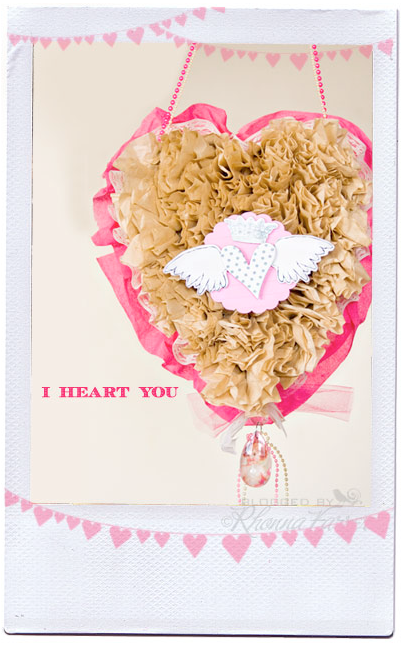
Coffee Filter Heart anyone?


....a little Valentine tutorial over on the Inspiration House....LOL...i wish I really DID move that fast! *sigh* this was fun...enjoy!

Monday, February 8, 2010

Saturday, February 6, 2010

Weekend crafting....DIY coffee filter flower tutorial

I've had lots of people as how we made the Spark coffee filter flowers. They are super easy & super cheap to make!
Here's a little video tutorial that will go hand in hand with a more complex project I'll have over at theValentine project
Inspiration House using our Heart Shadow boxes to make a hanging Ruffled Heart Wreath! so fun!

*if you can't see the embedded video here, just click HERE.
supplies:
pack of coffee filters (brown or white)
stapler
hot glue/gun